Hi,
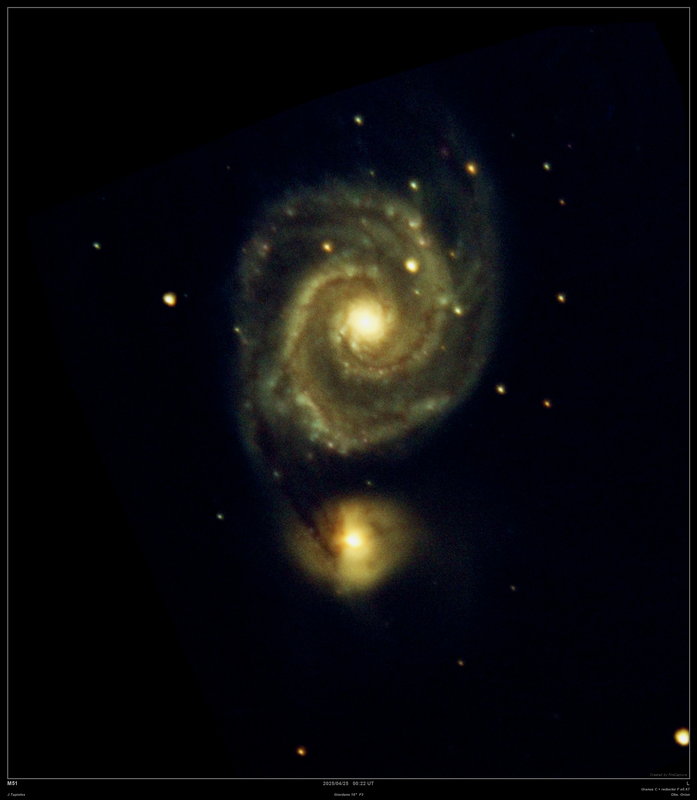
Last night I was shooting live stacking images.
I set the color to automatic in Sharpener and this is what came out. https://i.postimg.cc/J0376pVt/Stack-300 ... ch-web.png
How to configure the color in the normal SharCap so that this yellowish color does not appear?
J.Tapioles (Pastorgalactico)
Obs.Orion Cod.MPC R50
TL 16" F4.5 Giordano.Picgoto ESP32go V5
Refr 120mm F5
Ocul. Explorer 82º.
Barl. X2-X3- X5 Explorer
Planetario informático Guia 9.1
Player One Uranus C .
Cor. coma HR explorer.
Redu. focal 0.67 Braña.
the automatic colour balance doesn't always give perfect results (although I am working on an improved version).
To correct a yellow colour like the one shown, you should increase the blue control slider (on the right hand side of the live stack histogram) gradually until you get the desired result.
Hi, if you're referring to the color settings from the live stacking histogram, you can't do it with regular SharCap, and you'll have to do it from the normal histogram on the far right.
To do that, would I have to disable the automatic color on all three channels and increase the blue channel until the yellowish color improves to a bluish hue?
Okay, thanks.
J.Tapioles (Pastorgalactico)
Obs.Orion Cod.MPC R50
TL 16" F4.5 Giordano.Picgoto ESP32go V5
Refr 120mm F5
Ocul. Explorer 82º.
Barl. X2-X3- X5 Explorer
Planetario informático Guia 9.1
Player One Uranus C .
Cor. coma HR explorer.
Redu. focal 0.67 Braña.
Hello;
I'm thinking of upgrading to the pro version.
Are the color settings in the pro version better than in the regular version?
With the regular version, if I increase the blue channel a little, the image up to the sky background turns blue.
Does this also happen in the pro version?
How much does the pro version cost, and how long does it last?
Regards
J.Tapioles (Pastorgalactico)
Obs.Orion Cod.MPC R50
TL 16" F4.5 Giordano.Picgoto ESP32go V5
Refr 120mm F5
Ocul. Explorer 82º.
Barl. X2-X3- X5 Explorer
Planetario informático Guia 9.1
Player One Uranus C .
Cor. coma HR explorer.
Redu. focal 0.67 Braña.
the Pro version of SharpCap is £14 (or a rough equivalent in Euro/$/etc) for a 1 year license.
The very latest updates to SharpCap 4.1 have a new option in the live stacking to do a background subtraction that can remove most of the background brightness (and any colour cast in the background due to light pollution). This makes adjusting the colour balance sliders in live stacking *much* easier - less sensitive to small changes and easier to get good results. You can test all of this in live stacking by trying adjusting the colour balance sliders and the background - SharpCap will ask you if you want to try out the Pro features and you say yes. From that point until you close/reopen SharpCap, you can test out the pro features but can't save, so you can check if they are useful to you before paying.