Page 1 of 1
Color Adjustment in Sharpap Normal
Posted: Sat Oct 26, 2024 1:22 pm
by pastorgalactico
Hello, I would like to know where to adjust the color channels of a camera in the normal Sharpap in live stacking, that is, I do not use Sharpap Pro.
Regards
Re: Color Adjustment in Sharpap Normal
Posted: Sat Oct 26, 2024 7:29 pm
by admin
Hi,
the colour adjustments in live stacking are a SharpCap Pro feature, so if you want to adjust colour without a pro license then you need to use the white balance adjustments which you will find among the camera controls on the right. Note that you should ideally adjust these *before* starting a stack, as they affect the colour of each added frame to the stack, so increasing (for example) the blue part way through the stack will only gradually affect the stack as more new frames with increased blue are added.
cheers,
Robin
Re: Color Adjustment in Sharpap Normal
Posted: Sat Oct 26, 2024 8:02 pm
by pastorgalactico
OK, thanks a lot
Re: Color Adjustment in Sharpap Normal
Posted: Sat Oct 26, 2024 8:46 pm
by pastorgalactico
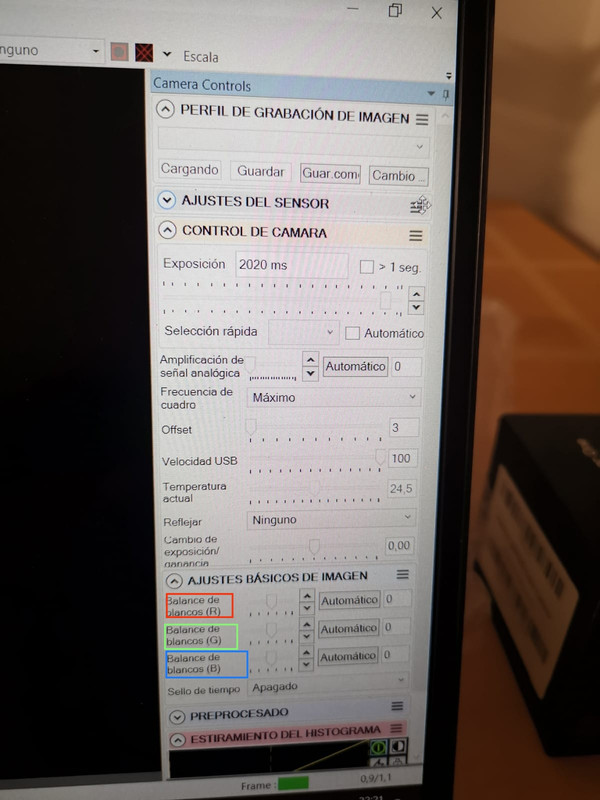
How is it done?
Re: Color Adjustment in Sharpap Normal
Posted: Mon Oct 28, 2024 2:02 pm
by admin
Hi,
yes, that's right - change those values to adjust the R/G/B intensity. You can use the sliders, up/down buttons or type the value you want in the box to the right of each slider.
cheers,
Robin
Re: Color Adjustment in Sharpap Normal
Posted: Mon Oct 28, 2024 5:55 pm
by pastorgalactico
Ok, try it