Page 1 of 1
JPEG Output
Posted: Sat Dec 23, 2017 6:09 pm
by frankieusn
I really need a way to save captured images in jpeg or convert in real time the png images that are produced. Is there a way to do this through scripting or does anyone know of a program that will convert png files to jpg in a watched folder (not batch) I mean real time as they are created without user interaction? I realize jpg is a reduced quality. It would get me one step closer to using SharpCap for my all sky project. Thanks in advance.
Re: JPEG Output
Posted: Sun Dec 24, 2017 11:48 am
by admin
Hi,
probably the easiest thing is for me to add this (JPEG output) feature to the program itself - doesn't involve much code and while I'm at it I can add TIFF output too.
cheers,
Robin
Re: JPEG Output
Posted: Mon Dec 25, 2017 4:30 am
by frankieusn
That would be amazing! I can't imagine I'm the only one that would like to have it. Make it a pro feature, I'm about to subscribe anyway for the dark subtraction and file name templates. The jpg is really all I need to use it for all sky. Not really concerned about the lack of ftp since fling ftp is a free sync program.
Re: JPEG Output
Posted: Mon Dec 25, 2017 9:03 pm
by admin
Try 3.1.4582 - has JPG and TIFF output hopefully does what you need.
http://www.sharpcap.co.uk/sharpcap/down ... a-versions
cheers,
Robin
Re: JPEG Output
Posted: Tue Dec 26, 2017 12:49 am
by roelb
It seems only to work for Snapshots, not for Save as Viewed with Live Stacking?
Re: JPEG Output
Posted: Tue Dec 26, 2017 12:45 pm
by admin
Hi Roel,
yes, that's right - with live stacking you've already put effort into capturing multiple frames and making a stacked image that is better than the individual frames. Having done that it would be strange to save in a lossy format like JPG!
cheers,
Robin
Re: JPEG Output
Posted: Thu Dec 28, 2017 3:03 am
by frankieusn
The new JPG format works great! I could hug you right now! Been banging my head against the wall for almost a year trying dozens of other programs with the ZWO ASI120MC as an all sky camera. They never work because they require the DirectShow driver...crash after crash. Since SharpCap uses the native driver it works as intended. Now with the jpg option and filename templates I can set it to capture unlimited and save timelapse sequences. Then using a free program called "Fling" I upload the images every minute to Weather Underground (which only accepts jpg.) You've got a subscriber for life here!
Re: JPEG Output
Posted: Fri Dec 29, 2017 4:05 pm
by admin
Ah, interesting, so this is for a webcam to go with weather station readings more than for a night all sky camera?
Anyway, good to hear that it's all working - enjoy!
Robin
Re: JPEG Output
Posted: Sat Dec 30, 2017 3:20 pm
by frankieusn
Robin,
It's both day and night so multi-purpose really. The ASI120MC has a good range of sensitivity that allows it to work 24/7 when in auto mode. The camera is mounted in a weather proof housing (search allsky ASI120MC project on instructables) with an allsky lense and is controlled by an Intel Computestick inside the enclosure with wifi and TeamViewer. Normally it just runs day and night in auto exposure mode taking 1 frame every minute and then uploads the images to WeatherUnderground (with Fling) hence the need to JPEG image files. The web site creates timelapse videos and keeps them saved online. I can review the frames manually on the computer for anything of interest and delete them when needed. However, if it's going to be a clear night and there is a meteor shower happening I'll just set the frame rate to maximum to catch every second for shooting stars. I preferred using a program like HandyAVI which is made to do stuff like this but, after a year of headaches due to the DirectShow driver I keep coming back to SharpCap for the native support of the camera. I've used the Revolution Imager R2 in the same way as the ASI120MC but, have never been happy with the image quality of the RCA composite video.
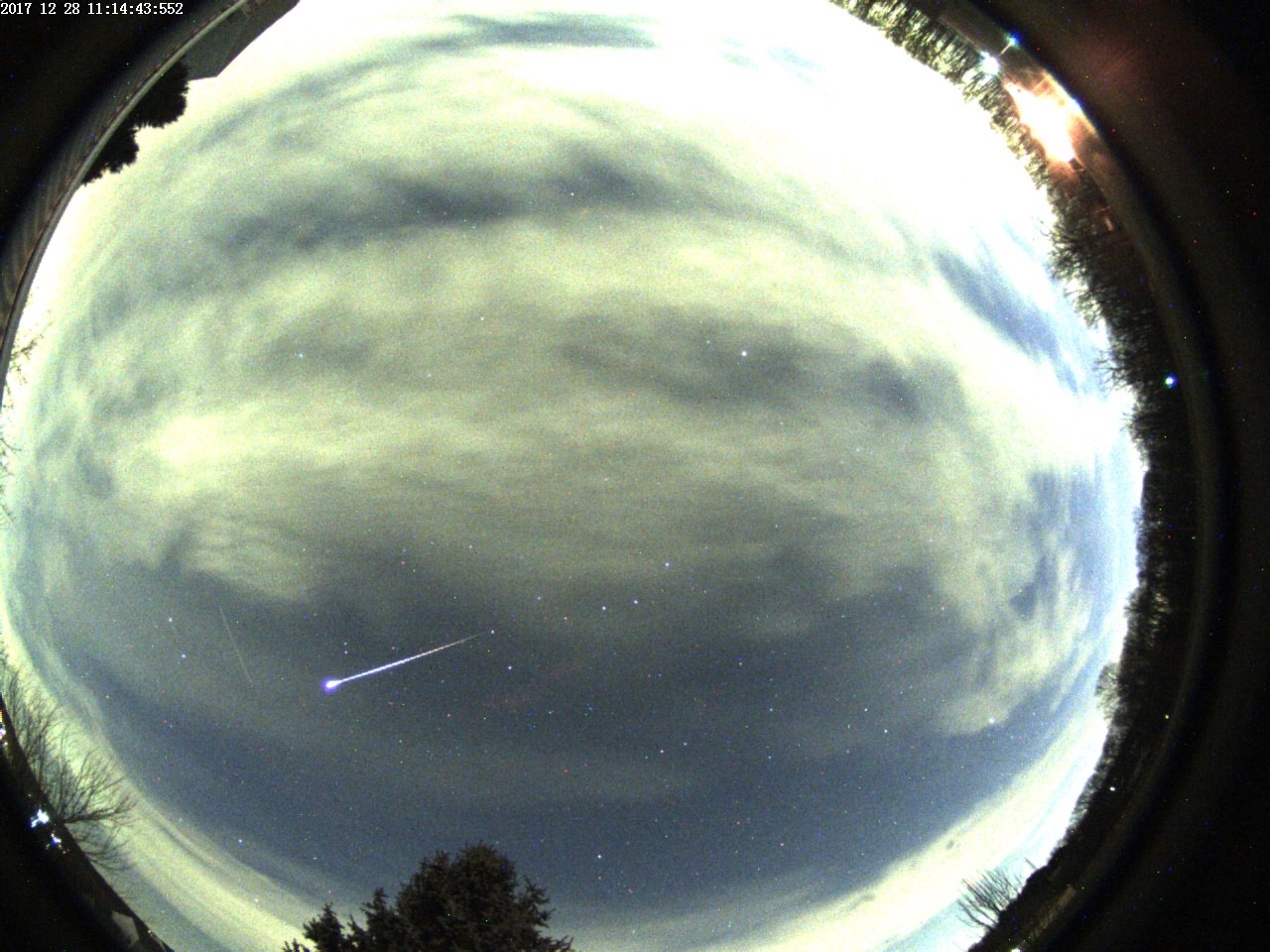
- Captured this meteor the first night after you added JPG output!
- Meteor_2017_12_28.jpg (232.76 KiB) Viewed 3951 times
Re: JPEG Output
Posted: Thu Apr 08, 2021 4:56 pm
by rampitup
We are currently setting up our new EAA at our public observatory, working with a RASA 11" and QHY268C with SharpCap pro. So far things work well apart from some unknown program failures which probably should be fixed soon. At present, we save the pictures 'Save as Viewed with Live Stacking' as TIFF and and sometimes as FITS. Fits are not really compatible with Macs.
However, our intention is to provide visitors to the observatory not only the pictures 'Save as Viewed with Live Stacking' on a TV screen but also with a picture which can be sent to their smart phones. JPG would fit nicely. Have you ever thought about this?
Otherwise we do have to convert the TIFF in to JPG by third program which is pretty cumbersome.