QHYCCD Cooling Workflow
Posted: Fri Dec 31, 2021 9:39 am
Hi folks,
I got the chance to setup my first cooled camera for the first time tonight: a QHY268C. Updated to the latest version of SharpCap, got the drivers installed, and then connected to the camera through SharpCap. With it being my first time using this particular camera, I scrambling to get my bearings at first. I was surprised when I found the target temperature had defaulted to 0°C with cooling power set to auto. By the time I noticed, the sensor temp had already reached 0°C and was stabilizing at that temperature. This all happened in just under a minute. Which was alarming considering the manual recommends against rapidly cooling the chip to avoid thermal shock.
From what I've gathered here in the forum so far, the default temperature is set at the driver level, and the QHYCCD driver apparently doesn't throttle the cooling process to avoid thermal shock. It leaves it up to the user to determine how fast they want to cool the sensor. Unfortunately, it doesn't look like there's an option under Thermal Controls in SharpCap Camera Controls to limit how fast the sensor is cooled (degrees per units of time). To keep this from happening again when connecting to the camera next time, I set the target temperature to 20°C, disabled automatic cooling power and set it to 0, saved these settings under a new profile, and set that profile as the default profile for this camera. So that the next time I connect to the camera, it'll load this default profile with cooling power disabled.
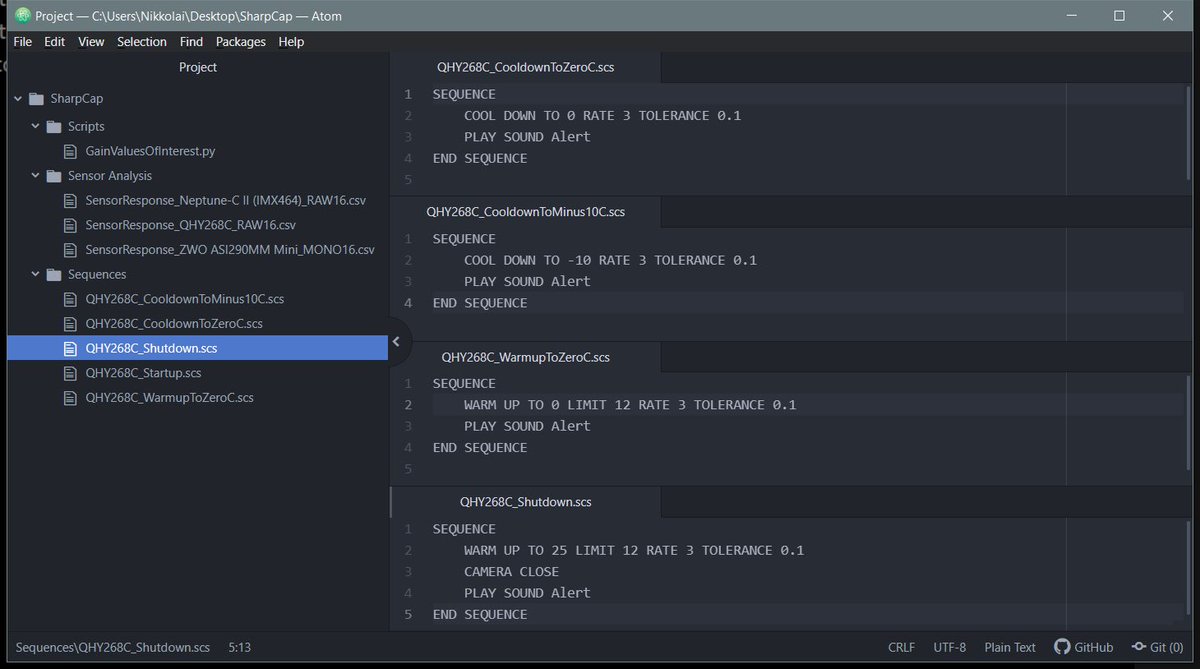
My question for y'all is, what sort of cooling workflow do you use in SharpCap to gradually cool the sensor before use, and then gradually warm the sensor before disconnecting the camera at the end of the session?
I've seen that the Sequence Planner has an option to cool the sensor gradually before an imaging session as a step in the sequence. Is there a simpler push-button way of doing this without having to run a sequence or a plan? For instance, I connect to my camera and then start the gradual cooling process while I'm still framing the subject and working out the details before starting a capture sequence. Then a similar push-button solution for warming the camera gradually before disconnecting the camera and wrapping up for the night.
One last comment I'd like to make: I know the default target temperature is set at the driver level, but it'd be nice if cooling power in SharpCap didn't default to auto when connecting to the camera for the first time. Would like to avoid the risk of thermal shock.
Thanks in advance,
Nikko
I got the chance to setup my first cooled camera for the first time tonight: a QHY268C. Updated to the latest version of SharpCap, got the drivers installed, and then connected to the camera through SharpCap. With it being my first time using this particular camera, I scrambling to get my bearings at first. I was surprised when I found the target temperature had defaulted to 0°C with cooling power set to auto. By the time I noticed, the sensor temp had already reached 0°C and was stabilizing at that temperature. This all happened in just under a minute. Which was alarming considering the manual recommends against rapidly cooling the chip to avoid thermal shock.
From what I've gathered here in the forum so far, the default temperature is set at the driver level, and the QHYCCD driver apparently doesn't throttle the cooling process to avoid thermal shock. It leaves it up to the user to determine how fast they want to cool the sensor. Unfortunately, it doesn't look like there's an option under Thermal Controls in SharpCap Camera Controls to limit how fast the sensor is cooled (degrees per units of time). To keep this from happening again when connecting to the camera next time, I set the target temperature to 20°C, disabled automatic cooling power and set it to 0, saved these settings under a new profile, and set that profile as the default profile for this camera. So that the next time I connect to the camera, it'll load this default profile with cooling power disabled.
My question for y'all is, what sort of cooling workflow do you use in SharpCap to gradually cool the sensor before use, and then gradually warm the sensor before disconnecting the camera at the end of the session?
I've seen that the Sequence Planner has an option to cool the sensor gradually before an imaging session as a step in the sequence. Is there a simpler push-button way of doing this without having to run a sequence or a plan? For instance, I connect to my camera and then start the gradual cooling process while I'm still framing the subject and working out the details before starting a capture sequence. Then a similar push-button solution for warming the camera gradually before disconnecting the camera and wrapping up for the night.
One last comment I'd like to make: I know the default target temperature is set at the driver level, but it'd be nice if cooling power in SharpCap didn't default to auto when connecting to the camera for the first time. Would like to avoid the risk of thermal shock.
Thanks in advance,
Nikko