Page 2 of 2
Re: Click to Recentre not behaving as expected
Posted: Sat Feb 17, 2024 2:05 pm
by admin
Hi Geoff,
thanks for the log and the screenshots - I don't quite know what is going on yet, but I think there is definitely enough information there for me to work it out... I will be spending some time trying to puzzle it out later today

cheers,
Robin
Re: Click to Recentre not behaving as expected
Posted: Sat Feb 17, 2024 2:58 pm
by Fir Chlis
No worries. Thanks for looking at it - and please let me know if you need anything more from me, or if I can help at all.
Though skies are looking cloudy for quite a few days...
Geoff
Re: Click to Recentre not behaving as expected
Posted: Sat Feb 17, 2024 3:20 pm
by admin
Hi Geoff,
I've recreated your issue now using ASCOM Sky Simulator and some tweaking of the SharpCap code to simulate your configuration. I have worked out enough to be able to point you at what needs to be done to fix the issue, although I haven't quite worked out exactly what/where the bug in SharpCap is yet...
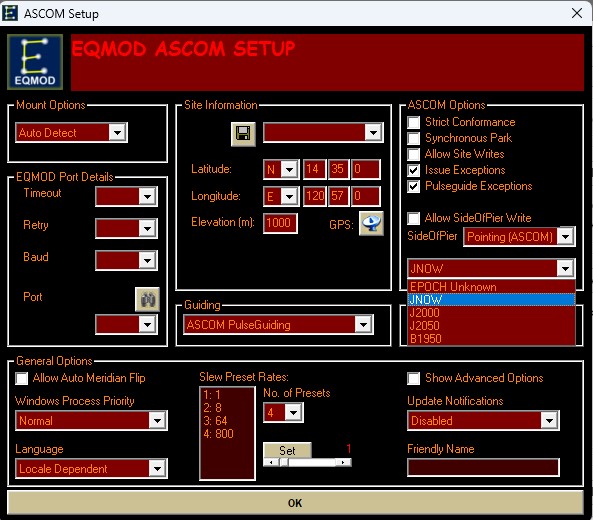
From the log, it looks like you have got your EQMOD configuration set to an Epoch of J2000 - this is the root cause of the issue. To be honest I don't actually understand why EQMOD lets you adjust this, because EQMOD always works in JNOW co-ordinates, so any setting here other than JNOW is giving false information to the application(s) working with EQMOD.
As shown in the screenshot below, please change the EPOCH option in your EQMOD setup to JNOW - this should work around the problem for you, since with correct info from the mount the issue in SharpCap doesn't happen.
cheers,
Robin
- Screenshot 2024-02-17 151418.jpg (91.75 KiB) Viewed 1399 times
Re: Click to Recentre not behaving as expected
Posted: Sat Feb 17, 2024 4:19 pm
by Fir Chlis
Hi Robin
Many thanks for that.
I've set SkySimulator (configure Telescope Simulator for .NET) to use "local" Equatorial System (was J2000) and that has solved the issue for the test setup.
I'll set ASCOM to use JNOW on my mount control laptop next time there's a clear night.
Thank you again for the prompt reply and do let me know if you want me to test anything else. I'll let you know in any case once I have tested live - may be a few days though.
Cheers
Geoff
Re: Click to Recentre not behaving as expected
Posted: Sat Feb 17, 2024 9:59 pm
by Fir Chlis
Sorry to be the bearer of another minor issue

but this is what caused me to discover the original issue.
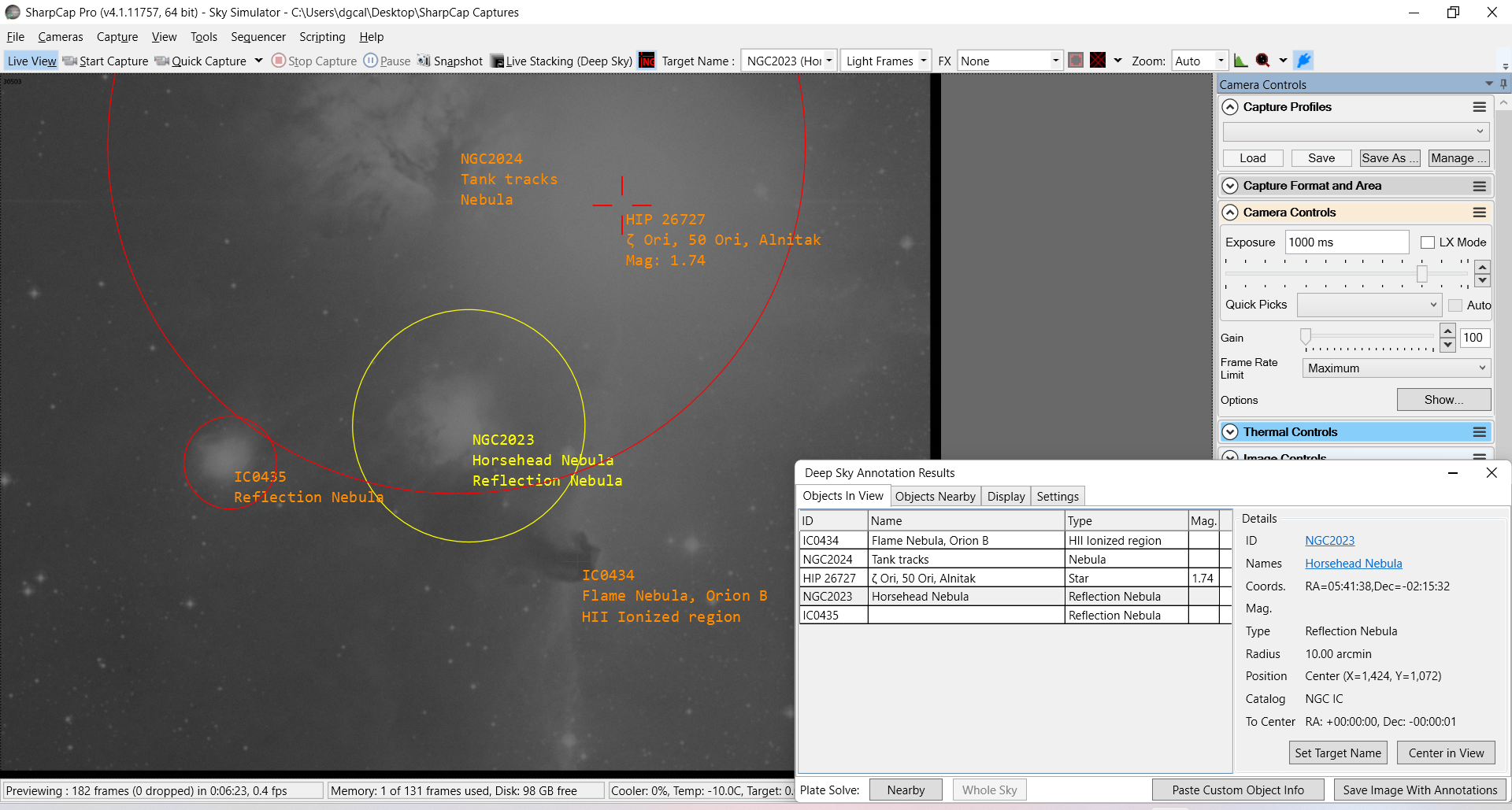
I searched for Horsehead Nebula, and did a goto, plate solve, sync. The Horsehead was off to the side of the screen, but NGC2023 was centred - which is when I tried the click to recentre the head of the horse. However, the goto was spot on for what I had (incorrectly) searched for.
When I look at the deep sky annotation, shown below, it looks like the numeric designations are all correct, but the common names are mixed up. If I've got it right, Flame and Tank Traps are the same object NGC2024, Horsehead is IC0434, and NGC2023 doesn't have a common name.
- Horsehead.png (857.76 KiB) Viewed 1376 times
Cheers
Geoff
Re: Click to Recentre not behaving as expected
Posted: Mon Feb 19, 2024 2:05 pm
by admin
Hi Geoff,
interesting... Having checked, the good news is that what is showing matches the data in SharpCap's embedded NGC/IC catalog, so at least it is a data bug, not a code bug. However the bad news is that the misidentification of common names seems to go back to the OpenNGC catalog which I used as a basis for SharpCap's catalog (
https://github.com/mattiaverga/OpenNGC/ ... base_files). I will have to look out for another source of common names of NGC/IC objects - and one that doesn't have problematic licensing/copyright conditions. At least, as far as I can tell, it's just the common names that are the issue, not positioning of the targets.
cheers,
Robin
Re: Click to Recentre not behaving as expected
Posted: Tue Feb 20, 2024 7:52 pm
by Fir Chlis
Hi Robin
I’m on the scope right now, and the click to recentre is spot on now, so many thanks for putting me on the right track.
Best wishes
Geoff