Page 2 of 2
Re: Plate solving problems
Posted: Sun Mar 19, 2023 1:19 am
by russ75
Hi,
I am trying to use ASTAP with SharpCap, but am stuck.
I've installed Astap.exe and database D50. When I click on "Test Selected Plate Solver," SharpCap recognizes that Astap.exe has been installed, but gives me the following message:
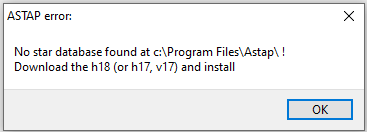
I downloaded and installed ASTAP database D50 because the ASTAP download page says that h17 and h18 are being phased out. I'm stumped as how to get ASTAP up and running with SharpCap.
Also, is there some way to install ASTAP in a non-standard location?
Re: Plate solving problems
Posted: Sun Mar 19, 2023 1:00 pm
by russ75
Please disregard my previous question about the ASTAP D50 star database. When I uninstalled it and then re-installed it, SharpCap immediately recognized it. ASTAP seems to be working now. I'm looking forward to putting it to the real test under the stars if the Oklahoma clouds and high winds ever break at the same time.
I am still curious to know, however, if it is possible to install ASTAP at a custom location such as D:\Program Files\astap\. . ., rather than the usual location on my laptop's hard drive at C:\Program Files\astap\. . .
Re: Plate solving problems
Posted: Sun Mar 19, 2023 1:24 pm
by Jean-Francois
Hello,
Yes, it is possible ... here an example on my computer.
Important is to select "Enter Manually".

- ASTAP_setting.jpg (126.14 KiB) Viewed 959 times
Jean-François
Re: Plate solving problems
Posted: Sun Mar 19, 2023 1:53 pm
by russ75
Hi Jean-Francois,
When I select Astap as the plate solving application, I do not get the drop-down with the option to select the path to Astap.exe. I only get the options when AstroTortilla, Ansvr, etc. are selected.
Re: Plate solving problems
Posted: Sun Mar 19, 2023 2:36 pm
by admin
Hi Russ,
do you have a fairly old version of SharpCap by any chance? I think the manual location option for Astap got added some time after the original Astap support, so maybe you have a version from the period where there was no manual option...
cheers,
Robin
Re: Plate solving problems
Posted: Sun Mar 19, 2023 3:08 pm
by russ75
Hi Robin,
Oops.

You are correct. Operator error. My laptop is operating with version 4.0.8282.0. I will install the latest version. I think that will solve the problem.