Hello;
I'd like to know how to automatically save the final image from the live stack.
Is it possible to choose a folder to save this image in?
When the stacking process finishes, is the final processed image automatically saved? At that point, a green notification appears at the top. Do I have to let this notification disappear on its own for the image to be saved correctly?
I ask this because sometimes the final image is very different from how the stack looked before it was saved.
Thanks.
How is the live stacking image automatically saved?
-
pastorgalactico

- Posts: 96
- Joined: Tue Jul 06, 2021 2:49 pm
- Location: España
- Contact:
How is the live stacking image automatically saved?
J.Tapioles (Pastorgalactico)
Obs.Orion Cod.MPC R50
TL 16" F4.5 Giordano.Picgoto ESP32go V5
Refr 120mm F5
Ocul. Explorer 82º.
Barl. X2-X3- X5 Explorer
Planetario informático Guia 9.1
Player One Uranus C .
Cor. coma HR explorer.
Redu. focal 0.67 Braña.
Obs.Orion Cod.MPC R50
TL 16" F4.5 Giordano.Picgoto ESP32go V5
Refr 120mm F5
Ocul. Explorer 82º.
Barl. X2-X3- X5 Explorer
Planetario informático Guia 9.1
Player One Uranus C .
Cor. coma HR explorer.
Redu. focal 0.67 Braña.
-
admin

- Site Admin
- Posts: 17381
- Joined: Sat Feb 11, 2017 3:52 pm
- Location: Vale of the White Horse, UK
- Contact:
Re: How is the live stacking image automatically saved?
Hi,
once the notification appears, the image has *already* been saved. In fact, if you click the filename in the notification bar then it will automatically open the saved file for you to view it.
Remember that there are 4 different ways to save a live stack
* 16 and 32 bit saves - these save the data in the stack itself without any stretch/colour adjustment or anything else applied. These will *not* look like what you see on screen, but are useful if you want to do the final processing in another application
* 'Save with Adjustments' - this applies all the stretching, colour adjustments and any enhancements chosen in live stacking like colour noise reduction or sharpening. This will match what you see on screen unless you are also using the 'Display Stretch' on the right while live stacking
* Save exactly as seen' - this includes the display stretch (if active) as well as the live stacking adjustments - this will be exactly what you see on screen in SharpCap.
You can choose any of these options when saving manually, and if you go to the right-hand-most Live Stacking 'settings' tab, you can choose which of the four are saved when an auto-save happens.
The exact filenames used can be configured in the 'Filename settings' page of the main settings. For exact control you would need to edit the filename templates manually, which is complex, but all documented here : https://docs.sharpcap.co.uk/4.1/#Filename%20Templates
cheers,
Robin
once the notification appears, the image has *already* been saved. In fact, if you click the filename in the notification bar then it will automatically open the saved file for you to view it.
Remember that there are 4 different ways to save a live stack
* 16 and 32 bit saves - these save the data in the stack itself without any stretch/colour adjustment or anything else applied. These will *not* look like what you see on screen, but are useful if you want to do the final processing in another application
* 'Save with Adjustments' - this applies all the stretching, colour adjustments and any enhancements chosen in live stacking like colour noise reduction or sharpening. This will match what you see on screen unless you are also using the 'Display Stretch' on the right while live stacking
* Save exactly as seen' - this includes the display stretch (if active) as well as the live stacking adjustments - this will be exactly what you see on screen in SharpCap.
You can choose any of these options when saving manually, and if you go to the right-hand-most Live Stacking 'settings' tab, you can choose which of the four are saved when an auto-save happens.
The exact filenames used can be configured in the 'Filename settings' page of the main settings. For exact control you would need to edit the filename templates manually, which is complex, but all documented here : https://docs.sharpcap.co.uk/4.1/#Filename%20Templates
cheers,
Robin
-
pastorgalactico
- Posts: 96
- Joined: Tue Jul 06, 2021 2:49 pm
- Location: España
- Contact:
Re: How is the live stacking image automatically saved?
Hello;
I don't understand what you mean by this.
Could you provide a screenshot of where that setting can be configured, as I want it to be saved exactly as it appears in the live stack?
I've attached the section where I think it says I need to edit it.
Can you tell me how to edit that?
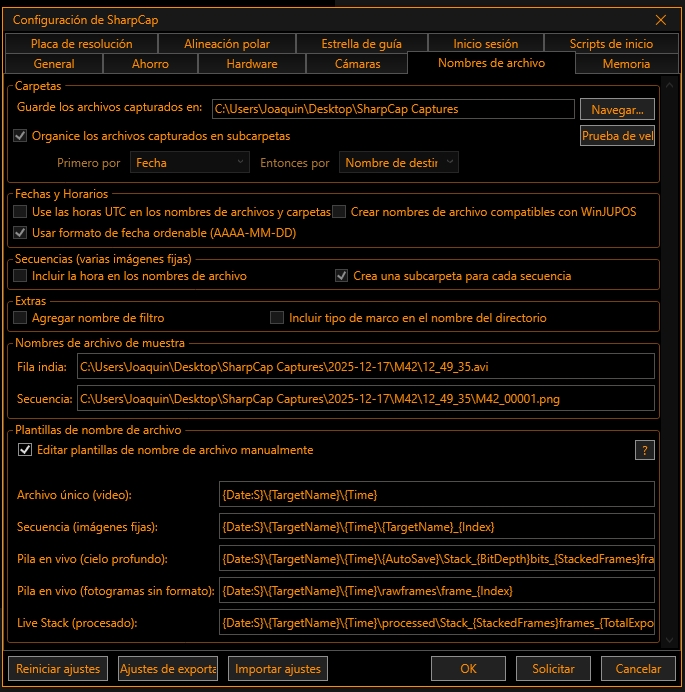
Or are you referring to this configuration?
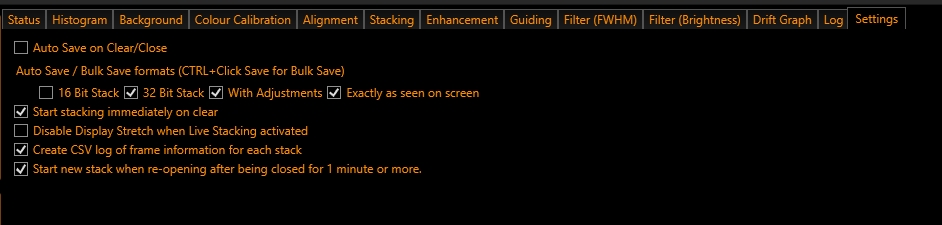
You can choose any of these options when saving manually. If you go to the "Settings" tab in Live Stacking, located on the far right, you can choose which of the four options will be saved automatically.
What would be the best configuration for me in the remaining options? Is the save option as it appears on the screen in live stacking the best, or can I also choose to save in one of the four available ways? For example, in 32-bit, etc.
I don't understand what you mean by this.
Could you provide a screenshot of where that setting can be configured, as I want it to be saved exactly as it appears in the live stack?
I've attached the section where I think it says I need to edit it.
Can you tell me how to edit that?
Or are you referring to this configuration?
You can choose any of these options when saving manually. If you go to the "Settings" tab in Live Stacking, located on the far right, you can choose which of the four options will be saved automatically.
What would be the best configuration for me in the remaining options? Is the save option as it appears on the screen in live stacking the best, or can I also choose to save in one of the four available ways? For example, in 32-bit, etc.
J.Tapioles (Pastorgalactico)
Obs.Orion Cod.MPC R50
TL 16" F4.5 Giordano.Picgoto ESP32go V5
Refr 120mm F5
Ocul. Explorer 82º.
Barl. X2-X3- X5 Explorer
Planetario informático Guia 9.1
Player One Uranus C .
Cor. coma HR explorer.
Redu. focal 0.67 Braña.
Obs.Orion Cod.MPC R50
TL 16" F4.5 Giordano.Picgoto ESP32go V5
Refr 120mm F5
Ocul. Explorer 82º.
Barl. X2-X3- X5 Explorer
Planetario informático Guia 9.1
Player One Uranus C .
Cor. coma HR explorer.
Redu. focal 0.67 Braña.
-
admin
- Site Admin
- Posts: 17381
- Joined: Sat Feb 11, 2017 3:52 pm
- Location: Vale of the White Horse, UK
- Contact:
Re: How is the live stacking image automatically saved?
Hi,
you don't have full customization over where the autosave files go, but the third and fifth entries in the manual templates list can have the '{AutoSave}' tag in them, which then changes the file/folder name to contain 'autosave' if the save is happening automatically. This allows you to keep the autosave files separate from the ones that you save manually if you want.
The choice of which formats to save in for autosave depends on what you intend to do with the images after they are saved by SharpCap...
If you intend to do significant further processing then choose 16 bit, 32 bit (or both) to get images that have the most detail in them for processing in applications like PixInsight or AstroArt.
If you just want to keep the images you have seen on screen in SharpCap then choose 'with adjustments' unless you also use the display stretch on the right when live stacking (most people don't, but some do) - in that case choose 'exactly as seen'.
cheers,
Robin
you don't have full customization over where the autosave files go, but the third and fifth entries in the manual templates list can have the '{AutoSave}' tag in them, which then changes the file/folder name to contain 'autosave' if the save is happening automatically. This allows you to keep the autosave files separate from the ones that you save manually if you want.
The choice of which formats to save in for autosave depends on what you intend to do with the images after they are saved by SharpCap...
If you intend to do significant further processing then choose 16 bit, 32 bit (or both) to get images that have the most detail in them for processing in applications like PixInsight or AstroArt.
If you just want to keep the images you have seen on screen in SharpCap then choose 'with adjustments' unless you also use the display stretch on the right when live stacking (most people don't, but some do) - in that case choose 'exactly as seen'.
cheers,
Robin
-
pastorgalactico
- Posts: 96
- Joined: Tue Jul 06, 2021 2:49 pm
- Location: España
- Contact:
Re: How is the live stacking image automatically saved?
Hi
So if I'm going to process the images to improve them, I have to choose between 16-bit and 32-bit?
I'm going to use this program https://astropicslab.com/
to process them after live stacking.
I don't know what you mean by stretching the screen to the right.
Regards.
So if I'm going to process the images to improve them, I have to choose between 16-bit and 32-bit?
I'm going to use this program https://astropicslab.com/
to process them after live stacking.
I don't know what you mean by stretching the screen to the right.
Regards.
J.Tapioles (Pastorgalactico)
Obs.Orion Cod.MPC R50
TL 16" F4.5 Giordano.Picgoto ESP32go V5
Refr 120mm F5
Ocul. Explorer 82º.
Barl. X2-X3- X5 Explorer
Planetario informático Guia 9.1
Player One Uranus C .
Cor. coma HR explorer.
Redu. focal 0.67 Braña.
Obs.Orion Cod.MPC R50
TL 16" F4.5 Giordano.Picgoto ESP32go V5
Refr 120mm F5
Ocul. Explorer 82º.
Barl. X2-X3- X5 Explorer
Planetario informático Guia 9.1
Player One Uranus C .
Cor. coma HR explorer.
Redu. focal 0.67 Braña.
-
admin
- Site Admin
- Posts: 17381
- Joined: Sat Feb 11, 2017 3:52 pm
- Location: Vale of the White Horse, UK
- Contact:
Re: How is the live stacking image automatically saved?
Hi,
the best thing to do is to save both in a test - if the software you are using reads the 32-bit correctly then use that, otherwise the 16-bit one.
By the stretch on the right I mean the display stretch - https://docs.sharpcap.co.uk/4.1/#Display%20Stretch - most people have that turned off when live stacking as live stacking has its own stretch. However, if you do use that you need the 'save exacltly as seen' to get the image as you are looking at on the screen saved to file.
thanks,
Robin
the best thing to do is to save both in a test - if the software you are using reads the 32-bit correctly then use that, otherwise the 16-bit one.
By the stretch on the right I mean the display stretch - https://docs.sharpcap.co.uk/4.1/#Display%20Stretch - most people have that turned off when live stacking as live stacking has its own stretch. However, if you do use that you need the 'save exacltly as seen' to get the image as you are looking at on the screen saved to file.
thanks,
Robin
-
pastorgalactico
- Posts: 96
- Joined: Tue Jul 06, 2021 2:49 pm
- Location: España
- Contact:
Re: How is the live stacking image automatically saved?
Hi;
Okay.
How do I disable that screen stretching option, which I think is the histogram that appears on the right side, right?
Regards
Okay.
How do I disable that screen stretching option, which I think is the histogram that appears on the right side, right?
Regards
J.Tapioles (Pastorgalactico)
Obs.Orion Cod.MPC R50
TL 16" F4.5 Giordano.Picgoto ESP32go V5
Refr 120mm F5
Ocul. Explorer 82º.
Barl. X2-X3- X5 Explorer
Planetario informático Guia 9.1
Player One Uranus C .
Cor. coma HR explorer.
Redu. focal 0.67 Braña.
Obs.Orion Cod.MPC R50
TL 16" F4.5 Giordano.Picgoto ESP32go V5
Refr 120mm F5
Ocul. Explorer 82º.
Barl. X2-X3- X5 Explorer
Planetario informático Guia 9.1
Player One Uranus C .
Cor. coma HR explorer.
Redu. focal 0.67 Braña.
-
pastorgalactico
- Posts: 96
- Joined: Tue Jul 06, 2021 2:49 pm
- Location: España
- Contact:
Re: How is the live stacking image automatically saved?
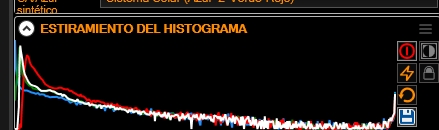
So it's deactivated, right?
J.Tapioles (Pastorgalactico)
Obs.Orion Cod.MPC R50
TL 16" F4.5 Giordano.Picgoto ESP32go V5
Refr 120mm F5
Ocul. Explorer 82º.
Barl. X2-X3- X5 Explorer
Planetario informático Guia 9.1
Player One Uranus C .
Cor. coma HR explorer.
Redu. focal 0.67 Braña.
Obs.Orion Cod.MPC R50
TL 16" F4.5 Giordano.Picgoto ESP32go V5
Refr 120mm F5
Ocul. Explorer 82º.
Barl. X2-X3- X5 Explorer
Planetario informático Guia 9.1
Player One Uranus C .
Cor. coma HR explorer.
Redu. focal 0.67 Braña.
-
pastorgalactico
- Posts: 96
- Joined: Tue Jul 06, 2021 2:49 pm
- Location: España
- Contact:
Re: How is the live stacking image automatically saved?
If I select 16-bit and 32-bit, I don't get any stacked images, only the frames are recorded.

Only one processed image appears if I mark it like this.

Only one processed image appears if I mark it like this.
J.Tapioles (Pastorgalactico)
Obs.Orion Cod.MPC R50
TL 16" F4.5 Giordano.Picgoto ESP32go V5
Refr 120mm F5
Ocul. Explorer 82º.
Barl. X2-X3- X5 Explorer
Planetario informático Guia 9.1
Player One Uranus C .
Cor. coma HR explorer.
Redu. focal 0.67 Braña.
Obs.Orion Cod.MPC R50
TL 16" F4.5 Giordano.Picgoto ESP32go V5
Refr 120mm F5
Ocul. Explorer 82º.
Barl. X2-X3- X5 Explorer
Planetario informático Guia 9.1
Player One Uranus C .
Cor. coma HR explorer.
Redu. focal 0.67 Braña.
-
admin
- Site Admin
- Posts: 17381
- Joined: Sat Feb 11, 2017 3:52 pm
- Location: Vale of the White Horse, UK
- Contact:
Re: How is the live stacking image automatically saved?
Hi,
yes, you have the display stretch turned off in that screenshot.
For the autosaving in different formats, in the screenshot you show, the auto save is turned off completely (top tick box), so it doesn't happen at all. I suspect that is why you are not seeing anything saved.
Robin
yes, you have the display stretch turned off in that screenshot.
For the autosaving in different formats, in the screenshot you show, the auto save is turned off completely (top tick box), so it doesn't happen at all. I suspect that is why you are not seeing anything saved.
Robin