Hello,
I have just purchased the license for SharpCap - for personal EAA use.
I am hoping to be able to see DSO objects with much better clarity than I can see them visually.
I am ok with setting up a motorized EQ mount with camera etc.
What I am struggling with - is a best first steps to take in using SharpCap
My hope is to have the scope tracking an object and then get the best possible view of it within perhaps 15 minutes if that is possible.
Can anyone recommend or suggest a video or other step-by-step instructions I can follow - so that I can start out on the right track?
Sincere thanks!
NEWBEE - For EAA - could someone suggest steps to follow?
Forum rules
If you have a problem or question, please check the FAQ to see if it already has an answer : https://www.sharpcap.co.uk/sharpcap-faqs
If you have a problem or question, please check the FAQ to see if it already has an answer : https://www.sharpcap.co.uk/sharpcap-faqs
-
admin

- Site Admin
- Posts: 17517
- Joined: Sat Feb 11, 2017 3:52 pm
- Location: Vale of the White Horse, UK
- Contact:
Re: NEWBEE - For EAA - could someone suggest steps to follow?
Hi,
if you like video tutorials then the best bet is to search for 'sharpcap live stacking' on youtube and you will find a whole host of people who have created videos showing how they capture images - for instance one example is https://www.youtube.com/watch?v=7OkfvSKL40c (you may like this one, or perhaps one of the others will suit you more).
cheers,
Robin
if you like video tutorials then the best bet is to search for 'sharpcap live stacking' on youtube and you will find a whole host of people who have created videos showing how they capture images - for instance one example is https://www.youtube.com/watch?v=7OkfvSKL40c (you may like this one, or perhaps one of the others will suit you more).
cheers,
Robin
Re: NEWBEE - For EAA - could someone suggest steps to follow?
Thank you Robin!
I assume you did that video??
That is awesome if you did.
If so - can I ask you a question or two?
You were introducing the gain slider
You said when you started to do imaging you would set the gain somewhere in the 400 value
And you mentioned a graph concerning your camera - and something about how it bottoms out - just above one single electron read noise.
I'm not familiar with this - could you describe what that is all about?
I assume you did that video??
That is awesome if you did.
If so - can I ask you a question or two?
You were introducing the gain slider
You said when you started to do imaging you would set the gain somewhere in the 400 value
And you mentioned a graph concerning your camera - and something about how it bottoms out - just above one single electron read noise.
I'm not familiar with this - could you describe what that is all about?
-
admin
- Site Admin
- Posts: 17517
- Joined: Sat Feb 11, 2017 3:52 pm
- Location: Vale of the White Horse, UK
- Contact:
Re: NEWBEE - For EAA - could someone suggest steps to follow?
Hi,
not my video, but fortunately plenty of people make them and do a very good job of it
The graph that is being referred to is the read noise vs gain graph for the camera - SharpCap can produce these by doing a sensor analysis of your camera, or you will probably find them on the manufacturer's product page for your camera. One might look like this...
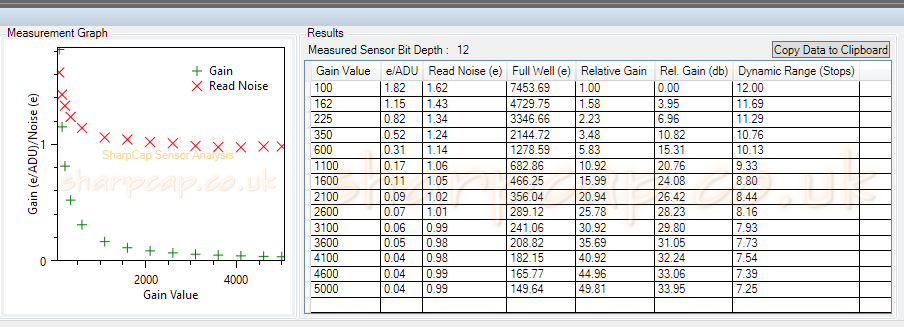
The key here is to look at the red crosses - they show the read noise of the camera and you can see that it drops away quickly as you start to raise the gain from the minimum value, but by about gain 600, most of the reduction is complete - it's much flatter from that point onwards. Usually it is good to pick a gain value at that point where the bulk of the initial drop is over and the remaining reduction as the gain increases further is small.
cheers,
Robin
not my video, but fortunately plenty of people make them and do a very good job of it
The graph that is being referred to is the read noise vs gain graph for the camera - SharpCap can produce these by doing a sensor analysis of your camera, or you will probably find them on the manufacturer's product page for your camera. One might look like this...
The key here is to look at the red crosses - they show the read noise of the camera and you can see that it drops away quickly as you start to raise the gain from the minimum value, but by about gain 600, most of the reduction is complete - it's much flatter from that point onwards. Usually it is good to pick a gain value at that point where the bulk of the initial drop is over and the remaining reduction as the gain increases further is small.
cheers,
Robin
Re: NEWBEE - For EAA - could someone suggest steps to follow?
AH! If I understand correctly - then with my camera - which is the ASI385 - a good gain setting would probably be around 350 - which is where its curve really starts to taper off?
- ZWO_385_GainCurve.JPG (39.33 KiB) Viewed 995 times

Re: NEWBEE - For EAA - could someone suggest steps to follow?
Hi,
Many imagers would choose Gain 100 to 200 with your camera. While there are benefits to increasing gain, the problem is that your Dynamic Range ends up in the crapper, meaning that stars become grossly saturated. It's better to choose something lower than 350 and spend more time at the telescope capturing photons.
Brian
Many imagers would choose Gain 100 to 200 with your camera. While there are benefits to increasing gain, the problem is that your Dynamic Range ends up in the crapper, meaning that stars become grossly saturated. It's better to choose something lower than 350 and spend more time at the telescope capturing photons.
Brian
Re: NEWBEE - For EAA - could someone suggest steps to follow?
Thanks Brian! :-]